Even though computers only understand in 1s and 0s (Binary), programming languages can be used to create software through the algorithms (instructions) given.
Windows PowerShell
Made by Microsoft in 2006, PowerShell has been found on Windows since XP and is aimed to bring users from the command prompt application to PowerShell where users can take more control of their operating system. It is normally used for task automation and configuration management.
Python
Made in 1991 Python has become the best coding language beating Java and other major coding languages. Quite a advanced coding language Python can do anything from making websites to other little tasks and is quite similar to c++.
HTML
Originally called Hypertext Markup Language, HTML is widely used for making websites. The current version of this language is HTML 5 which superseded HTML 4 in October 2014. . It has the file name extension .html and its first release was in 1993.
Java
Made in 1995, Java is one of the most famous coding languages. It has a estimated 10 million users. Now part of Oracle, it originally was owned by Sun microsystems. Like Python it is quite similar to c+. Commonly linked to JavaScript, Java has no relations to it at all.
JavaScript
JavaScript has no official governing body and therefore has many different logos. JavaScript was made in 1995 and is developed by Netscape communications. It is commonly party of internet browsers and has no relation to Java. Although it is one of the best programing languages many people do not use it as it too amateur. There is confusion as to who owns it but it is thought to be owned by Oracle.
C
First appearing in 1972 there have been many adaptions of this programing language such as c+ and c++. Originally C was made to be used with Unix based operating systems and is closely tied in with them. It was so popular that the Unix operating system was rewritten in C. C has the file name extension .c and is widely used for operating systems.
C+=
C+= (not c+) is a programing language that is feminist. It was made to take on other popular programing language while helping women to become interested in computer science.
C++
C++ is a adaption of the C operating system. It was made in 1983 and has many file name extensions such as .c++ and .cc and is used in operating systems.
Basic
Basic is a programing language that was made in 1964. It was intended to be basic and simple but also being high levelled. BASIC is the acronym for Beginner’s All-purpose Symbolic Instruction Code. It was made at Dartmouth collage by John G. Kemeny and Thomas E. Kurtz.
Microsoft's adaptions.
Many programming languages have been adapted by Microsoft such as Visual-basic, Visual-c#, visual-C++ and Visual-J++. These have been really popular and easily accessible to Microsoft engineers and consumers.
High Level & Low Level
High-Level Languages
- One instruction represents multiple machine-code instructions
- It will work on different computer systems
- Easier to use for programmers as data structures can be used simply
- Easy to read, understand and modify
- The computer will only understand it if it is translated into machine code
- Less memory efficient and slower as the CPU is not fully controlled
- Python, C, C++, JavaScript
Low Level Languages
- One instruction represents one machine-code instruction
- It will not work on different computer systems.
- Harder to use for programmers as the internal structure of CPUs will need to be known
- Hard to read, understand and modify
- No transator is needed
- More memory efficient and faster as the CPU is controlled
- machine code
Constructs
Selection
IF-THEN-ELSE statements that allow you to check if a condition is true and what should happen for each possible scenario.
Nested IF statements check more conditions after to filter.
Iteration
REPEAT-UNTIL
Until a condition is TRUE. Checked at end so code will run at least once. Infinite if it is always false.
WHILE-END WHILE
While a condition is TRUE. Checked initially, so code may never run. Infinite if it is always true.
DO WHILE
While a condition is True. Checked at end so code will run at least once. Infinite if it is always true.
FOR
Loops will run for a certain specified amount of time.
Procedures
Set of instructions stored under one title. Only need to call its name to run the code. Can run as a function and take a parameter but don't need to. Forms a sub-routine.
Functions
Similar to Procedures but will always return a value as they always take a parameter. Needs to be assigned to a variable or used in a statement as it will be forgotten as it is not stored. Forms a sub-routine.
Variables
Data value that can be changed. Needs to be declared at beginning of code. Local variables can only be used in the section of the code they are used in, not in sub-routines, so the same name can be used elsewhere. Global variables can be used anywhere at any time and can become hard to keep a track of.
Constants
Data value that does not change. If attempted to change, user will be presented with an error. Needs to be declared at beginning of code.
Arrays
Data structure to store lists. Works like a database and manipulated using SQL type commands.
Can be one-dimensional (like records) or two-dimensional (like full database).
Computational Thinking
Decomposition- breaking down a large problem into simpler smaller steps so each individual problem can be solved independently and individually.
Abstraction- picking out the important information in the problem and ignoring specific deatils that will not impact the solution.
Algorithmic thinking- The logical way through steps of solving a problem, that allows you to use the solution to solve other similar problems.
Psuedocode
'Fake Code' Instructions for solving a problem wrote in code that is universal and not specific to any programming language. Reduces need for syntax and is quick to write and easy to convert to any programming language. There is no actual way of writing it as long as it clearly shows the problem and the steps to solve it.
^These provide reals numbers, not always integers so these can be used instead:
Quotient- DIV - Only gives the whole number accumulated
Remainder(modulus)- MOD or % - gives what is left over
Comparisons:
Equal- ==
Not Equal- != or <> (or ≠)
Less than- <
Greater than- >
Less than or Equal- <=
Greater than or Equal- >=
IDE
Integrated Development Environment that helps programmers to code.
Software that has a:
Code editor to write code and has:
line numbering
auto-colour coding - for types of code words
auto-correct - to correct spellings
auto-indentation - for easiness
auto-complete - to reduce time Run-time Environment to show code and identify where errors happen Explorer Windows to navigate between programs
Output Windows to show results of calculations Line number tracker to show where the code has ran up to Error Diagnostics and Debugging Tool to find and fix errors by giving suggestions Breakpoints to allow code to only run up to a certain point
Translator to turn the code into machine code Auto-documentation to show what the code does GUI (Graphical User Interface) to drag and drop objects to build a program with a GUI
Translators
Assemblers
Translates assembly code to machine code.
Each CPU type needs an unique version
Compiler
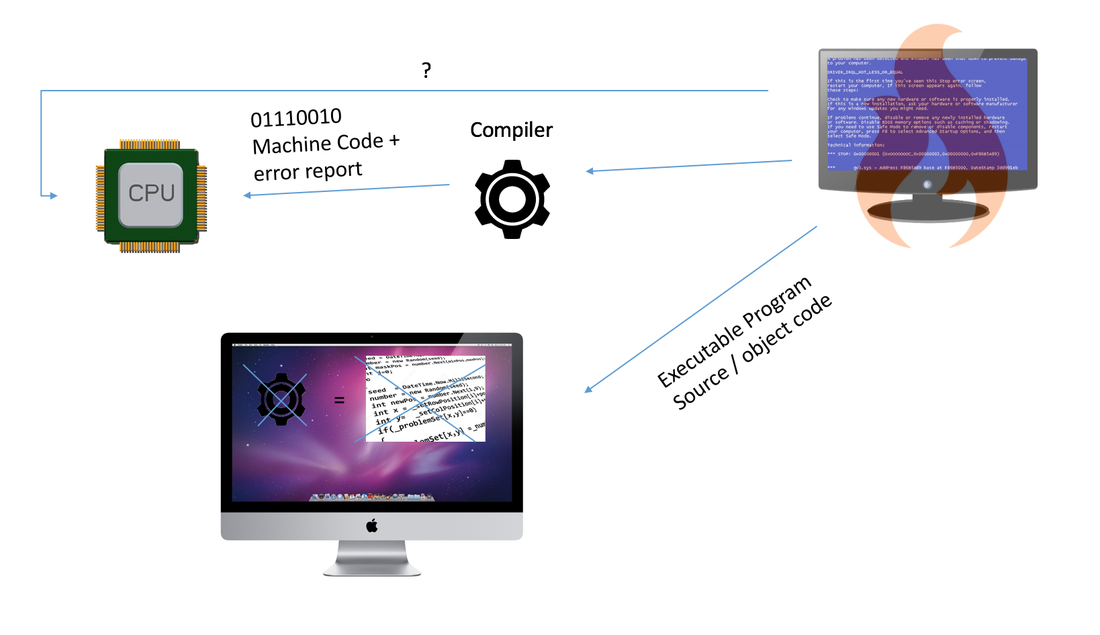
Translates all the source code at the same time to create one executable file.
Only needed once.
Will return a list of errors
Program runs quickly
Translation takes a long time
Interpreter
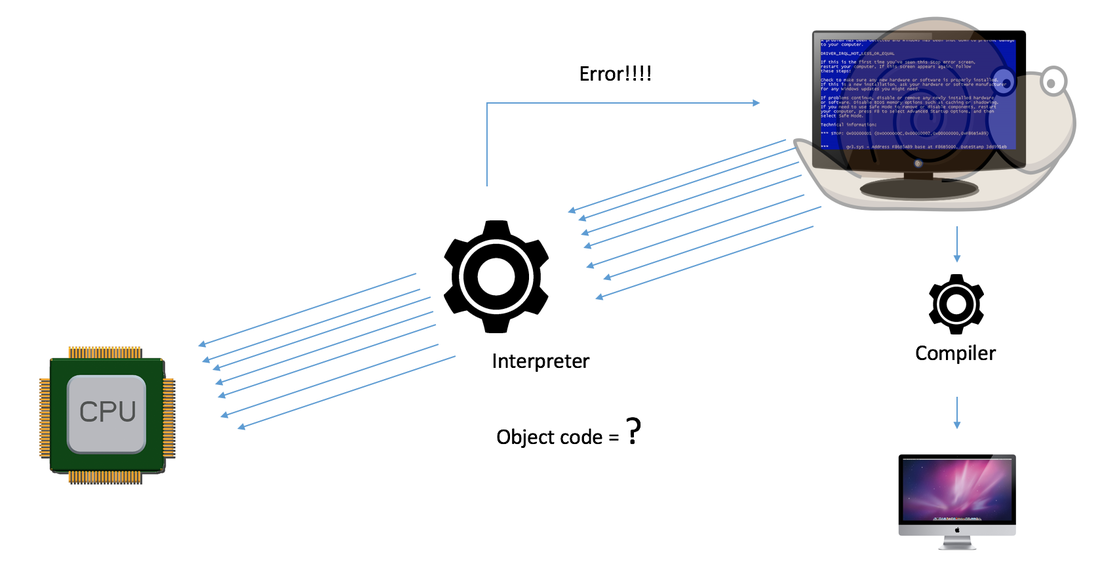
Translates the source code one instruction at a time
Does not create an executable file
Needed every time to run the program
Will return a error at a time, stopping the program, good for debugging
Program runs slowly as translation is done at the same time
Errors
Runtime errors
Errors that cause the program to crash while running. Only found when executed. Syntax errors
Mistakes in the way the code is written. Does not let the function run. Logic errors
A bug in the code which makes the program operate incorrectly.
Testing
Iterative testing
Testing the code as you are coding it. Final/Terminal testing
Testing once the code has been completed.
Data
Valid
Correct Data. In Range
Maximum/minimum value accepted. Out of Range
Value that is too high or two low to be accepted. Null value
When no value is entered. Invalid
Wrong data type.
Checking Data
Data Validation
Validation checks if the data is sensible but can not check if the data entered is a mistake or lie. It works by checking if the data is adhering to certain rules defined. Data Sanitisation
Sanitisation cleans data so it can be used. it stops users trying to access the system by entering other characters. It removes unwanted characters.
E.g: Cat not C@t. Authentication
Checks if the user is who they are such as using a password, code or physical item.
Programming
Maintainability
Updating code so that is is never vunerable to attacks and solves bugs. Comments
Comments are used to inform the reader of bugs or isues or to explain the code. It can also be used to stop lines of code from running. Indentation
Splitting up code so that it is more readable.
Planning
Anticipating Misuse
When a program knows the user is misusing the system such as entering in the same invalid data. Planning for contingencies
Anticipating misuse then creating parametres to stop the misuse.
Checking Entries
Presence Check
Checking something has been entered. Type Check
Checking a word, integer or number has been entered. Length Check
Checking that the characters entered add up to a certain length. Spell Check
Checking the work that has been entered is spelt correct. Num Check
Checking a number has been entered.
Program Testing
Performace Test
See how quickly features run and how much power they use. Usability Test
Checking how user-friendly the interface is. Security Test
Seeing how securely the data is kept and how vulnerable it is. Load/Stress Test
How well the proram runs under extreme conditions.
Software Development Cycle
1) Requirements
2) Design
3) Implementation
4) Testing
- go between these steps for iterate testing to improve the code and add features
- don't repeat for final testing where all features are made at once
5)Maintenance and Updates
Command Boxes
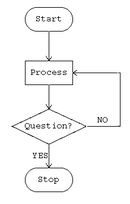
Start-stop
Box with rounded corners
Inputs/Outputs
Parallelogram
Decision- Yes or No
Dimond box
Sub Routine- Reference other flow diagrams
Box with lines at sides
Process - Instructions or Calculations
Rectangle box
Arrow- connect boxes
Show dirction, can be multiple for different options from one box
Algorithms
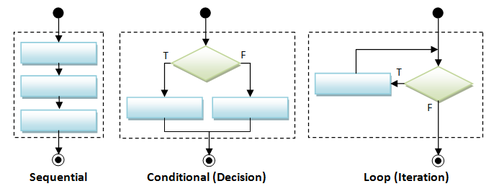
Flow diagrams can show algorithms for sequences, selection and iterations.
Logic Gates
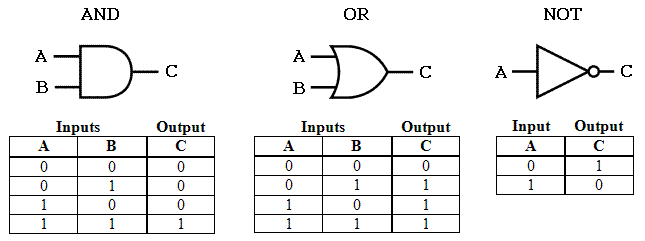
They use binary data to carry out boolean operations.
AND- Has a value of 0 unless all values are 1. (A /\ B)
OR- Has a value of 1 if at least one 1 is present. (A \/ B)
NOT- Makes it the opposite value. (¬A)
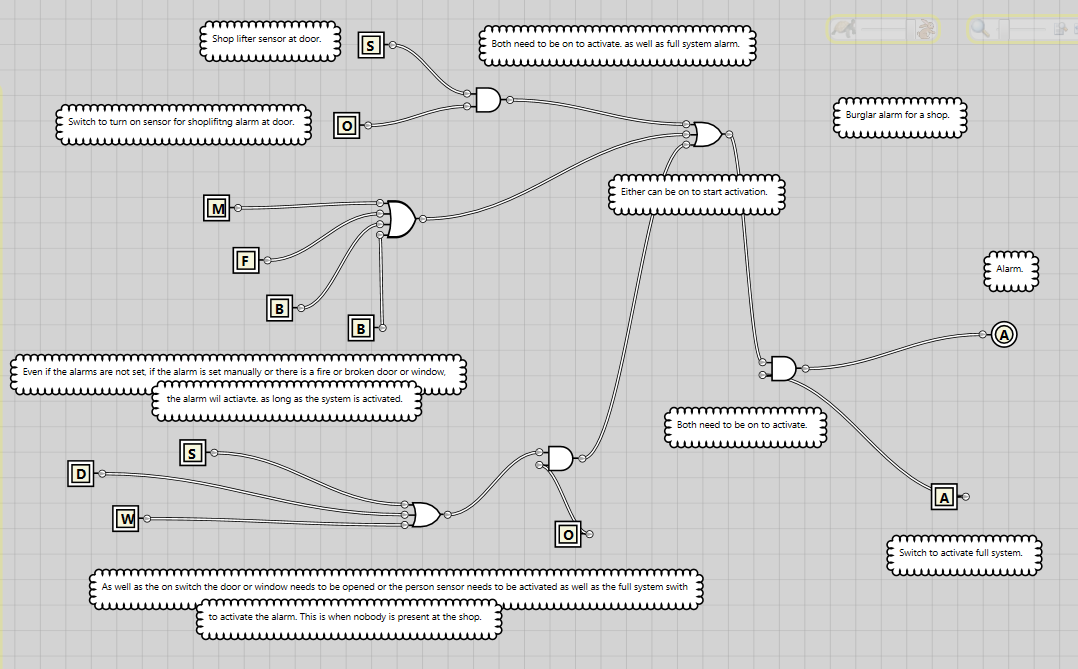
More complex circuits will require the first gate to be worked out then the answer is used as one of the inputs for the second gate.
Real Life example:
Data Type
Integer
INT
Whole Numbers
'0'
'100'
Real/Float
REAL
Decimal numbers
'1.1'
'-2.2'
Boolean
BOOL
True or False
'1/o'
'yes/no'
Character
CHAR
single letter, number or symbol
'a,A,2,#'
String
STRING
Text
'Hello'
Organising Data
Data is stored in Databases that have Tables which contain:
Columns/Fields
Rows/Records
Primary Key
Fields are used to store a category in such as names, ages and addresses. They all must be of the same data type.
Records are used to store data about a specific item.
A primary key is the unique identifier for each record of data so that it can be easily found.
Databases can be:
Flat-file
Relational
Flat-file databases use one table that are opened from one data file.
Relational databases combine multiple flat-file databases that are linked by key fields.
SQL
Structured Query Language
Used to create, update and search databases.
Uses Standard commands called statements.
-To create a table use 'CREATE TABLE' whole specifying fields with their name and type.
Data Types
INTEGER
REAL
TEXT
DATE
BOOLEAN
-e.g: CREATE TABLE test (one INTEGER PRIMARY KEY, two TEXT, three DATE);
'PRIMARY KEY' specifies which column is the primary key.
-Then add data using 'INSET INTO'
e.g: INSET INTO test (one, two) VALUES (1, hi)
(To add some data)
e.g: INSET INTO test VALUES (1, hi, 02/03/2017)
(To add a complete row)
-To update a record use 'UPDAT' 'SET' 'WHERE'
e.g: UPDATE test SET two = "bye" WHERE one = 1
-To select data use 'SELECT' 'FROM'
e.g: SELECT one, two FROM test
(To select certain parts)
e.g: SELECT * FROM test
(To select all)
-To filter results use 'WHERE'
Use 'AND' 'OR' to make it more specific
e.g: SELECT * FROM test WHERE one >= 5
-To find patterns use 'LIKE' which will search for those characters in all words
e.g: SELECT * FROM test WHERE two LIKE "h"
-To order data use 'ORDER' and 'ASC' for ascending or 'DESC' for descending order
LINEAR SEARCH
What is it?
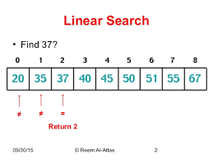
A way of finding a chosen value within a list. It sequentially checks each element until a match is found or all the elements have been searched.
When is it used?
When you fetch something from the computer it will go through the data till it gets to the one you want. you also use it yourself when you are looking for something as you go from one side to another till you find what you are looking for.
Example:
The Linear search is to find the number '37'.
It goes through every number such as '20' and '35' but as they are not right it keeps going to where it gets to '37' which is value 2 because Binary starts at 0 and the numbers are in a array.
Binary Search
What is it?
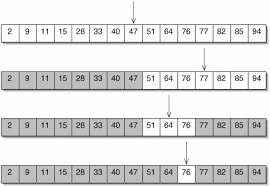
An algorithm for search that finds the position of a target value in a sorted array. It will first check the middle value. If it is not the value it will determine if the chosen value is higher or lower. It will then remove the half of the data that is not needed and select the middle again and repeating until the chosen value is found. If there is an even amount of numbers left it would calculate (n+1)/2 which would give a value of n.5 that is rounded up.
When is it used?
Although it is not widley used it is learnt by all programmers as it is sometimes used in coding when looking for a specific number and especially in debugging when you need to know which value is at error.
Example:
To find the number 76:
The middle number '47' is found.
As that is not the number as it is smaller all smaller numbers are removed and the next middle number is found which is '77'. However as it is too big all bigger numbers are removed. Then the next middle number '64' is found. As this is too small the smaller numbers are removed which leaves '76' the number that was wanted.
Bubble Sort
What is it?
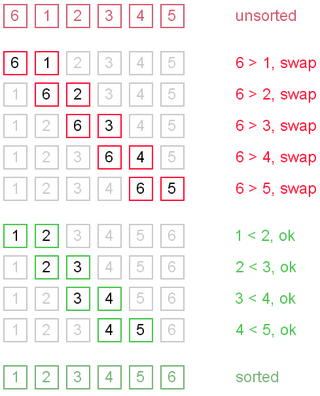
Bubble Sort is where you move through a list, swapping the elements if they are in the wrong order.
Why it is used?
A bubble sort could be used in a database to organise ages or to sort a list in excel. Or it could even be used in a computer for the CPU to organise the open applications into most used so that it will put more power into them.
Example:
The numbers are not in the right order as 6 is bigger than all the other numbers but is first. So the computer will check through the numbers changing the order if it is wrong. After correcting it it will check through to see if any other numbers are in the wrong order.
Advantages
It is (quick) efficient for small sets.
It is memory efficient.
It is very accurate as it checks over all of the values at the end.
Easy to understand.
Disadvantages
It is (slow) inefficient for large sets.
Less efficient than Merge or Insertion sort.
Inefficient when smaller numbers are at the right of the list.
Has a lot of passes which may not be needed.
Merge Sort
What is it?
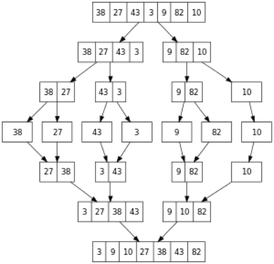
Merge Sort is where a sequence of numbers are split in half till they become separated and then are joined together (merged) while being put into order at the same time, until the sequence is sorted.
Why is it used?
A merge sort could be used to sort very complex sequences by a team of people in a data centre who take a section each.
Example:
The numbers are not in the right order as 27 comes before 38, so they will be split into individual numbers. Then two pairs will be joined together such as 27 and 38 with 3 and 43 while being ordered such as 3 and 27 and 38 and 43, until they are sorted.
Advantages
Easy to implement.
Works well with large amounts of data.
It is accurate as it sorts at multiple points.
Easy to understand.
Disadvantages
It is (slow) inefficient for very large sets.
Uses a lot of memory.
Requires lots of calculations.
Allows multiple people to solve it.
Insertion Sort
What is it?
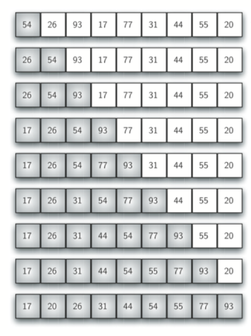
Insertion Sort is where numbers are checked and ordered if necessary one at a time. This is done by comparing the value to all the other numbers to see if it is smaller and needs inserting.
Why is it used?
A insertion sort could be used to sort very simple sequences or when they are nearly sorted as it allows you to compare quickly.
Example:
The numbers are not in the right order as 26 comes before 54, so when 26 is compared to 54 it will be placed before it. Then until they are sorted the algorithm will continue.
Advantages
Easy to implement.
Works well with small sets.>
Good for nearly sorted sets.
It is memory efficient.
Disadvantages
It is (slow) inefficient for very large sets.
Takes a lot longer when reaching longer sets.
Requires lots of comparisons.
Requires a lot of shifts.
WHICH SORTING METHOD IS MOST EFFICIENT OR DOES IT VARY?
Insertion sort is the most efficient sorting method as it allows you to quickly compare and move numbers if they are not in the right order. However it is not suitable for long sets of data as it takes time to compare. It is the most common real life scenario for sorting objects. Bubble sort is most efficient in a computer for the CPU when used to organise the open applications into most used so that it will put more power into them. However it is inefficient when a large number of swaps are required as it takes time and then multiple passes will need to be used until it is fully sorted. Merge sort is easy to understand and is efficient with long sets of data as it can be divided between a group of people and provides more accurate results. However for smaller sets of data it is too time consuming.