Binary is a base 2 counting system made up of 1's and 0's. The 1 is used to represent on or true and the 0 is used to represent off or false. Binary is used by computers to do calculations and carry out operations.
We use Denary, a base 10 counting system, like the 10 fingers we have. It is made up from 1,2,3,4,5,6,7,8,9 and 0.
Adding Binary Numbers
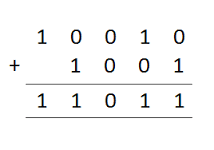
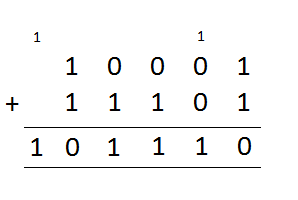
Place the two binary numbers into a column and go across adding them together.
0+0=0, 1+0=1, 0+1=1, 1+1=0 and carry the 1 to the next column.
In a 8-bit system there can only be 8 different bits, after that the bits start to overflow because the computer can not store more than 8 bits. Therefore the CPU drops the extra bit. Normally without dropping the extra 1, the computer would think that the number+1=0. On a computer this would create a overflow error. Overflowing causes a loss of data and accuracy which can cause crashes, therefore the overflows is stored elsewhere.
Here is an example: (The one in the brackets has overflown.)
11001111
11111111
----------
(1)11001110
Binary Shifts
As binary starts with 1 and is doubled each time, binary shifts can double or half a number.
A binary shift to the left would add a zero onto the end and cause the number to double. Left shifts can cause overflows. A binary shift to the right would cause the number to half, but the numbers dropped must be zeros.
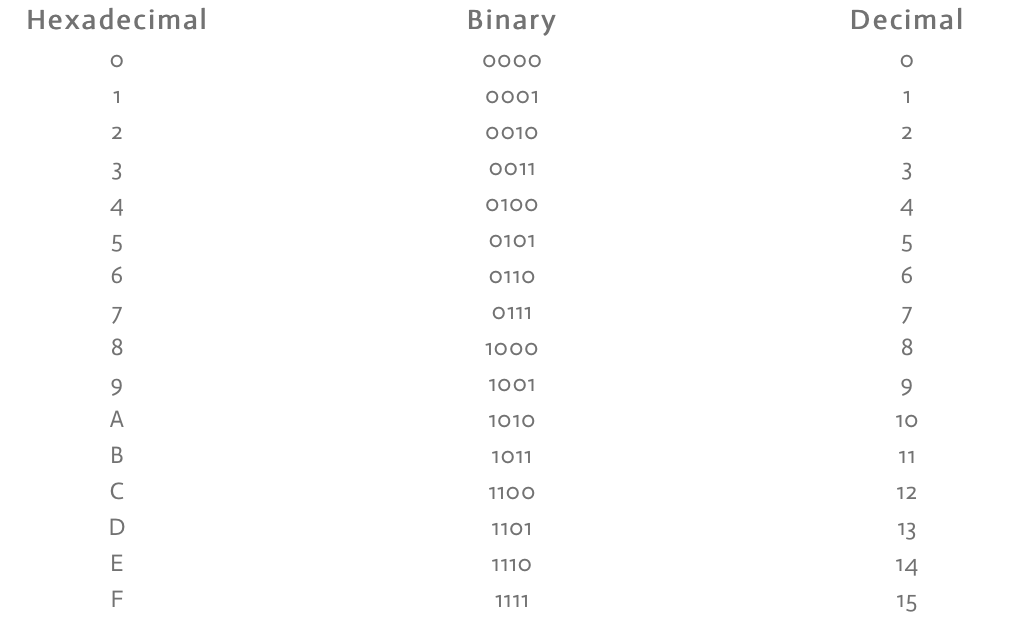
CONVERSION TABLE
Remember that Hex ends at 9, as that is where 4 bit binary ends, then the characters are letters going to F.
Binary to Hex
To convert your binary number to hexadecimal split it into 2 nibbles (2 4-bits) like this:
01101010 = 0110 1010
then convert each of the 2 nibbles into 1 hexadecimal character:
0110=6 1010=A = 6A
(Always put the number first.)
(If it is two numbers like 7 and 2 put them together to make 72.)
If you don't know the values automatically, set up a binary weighting line to get the denary number than convert that to hexadecimal using the value table, as you don't need to divide by 16 because a nibble can only add up to 15.
If there are 3+ nibbles, work out each one separately then join the characters together.
Hex to Binary
To convert from hexadecimal to binary, split up the two characters and work out the denary value. Then set up binary weighting lines and convert the number to binary. The join the nibbles together to get one value.
Denary to Hex*
To convert from decimal to hexadecimal, divide the decimal by 16. The final whole number is then converted to hexadecimal along with the remainder.
45 / 16 = 2 Remainder = 13=D = 2D
(After 9, the hexadecimal character is then a letter.)
(Put the number first.)
Hex to Denary*
To convert from hexadecimal to denary, times the first number by 16 and add the second number.
5F 5X16=80 80+15 = 95
87 8X16=128 128+7=135
*
They can be worked out like this because a weighting line can be used where each number along is multiplied by 16, so it becomes:
4096, 256, 16, 1
But as hex numbers are two digts long, the line becomes:
16, 1
allowing these methods to be used as timesing by 1 is the same as using the number.
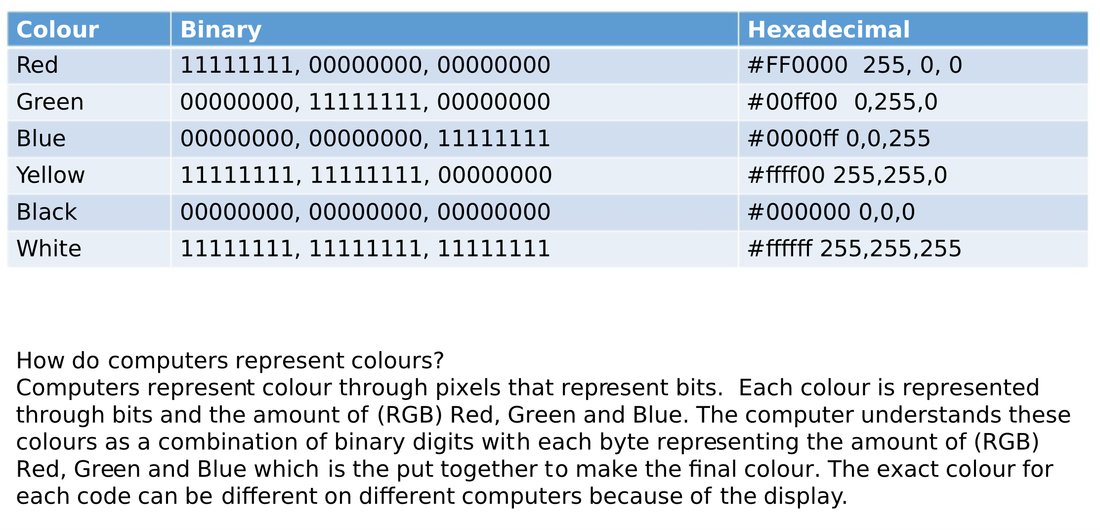
Colours
Why Compress?
Compression means that:
- Less storage space will be took up
- Uploading, streaming and downloading will be quicker
- Web pages will load faster
- Makes sure email attachment restrictions aren't met
Lossy
Lossy means that when the file is compressed, it loses some data which means the file can not be restored. However it reduces the file size greatly. It can't be used on text files as they need all the data. The quality is reduced but is usually unnoticeable.
There are many types of file formats such as:
.ZIP
Zip allows multiple files to be compressed when the files are put into a folder. It is usually built into the OS.
.MPEG / MP4
(Motion Picture Electronics Group)
MPEG allows audio and video to be compressed. MPEG2 is used for DVDs and MPEG4 is used online.
.JPG / .JPEG
(Joint Picture Electronics)
JPEG is used to compress images. However it does not work well with sudden colour changes.
.MP3
(MPEG audio layer 3)
MP3 allows audio to be compressed. It is used in MPEG2. A newer ACC (Advanced Audio Encoding) has better sound quality.
Lossless
Lossless unlike Lossy will be able to go back to the original file when they are decompressed and has a better quality. However the file size will be greater than Lossy.
.GIF
(Graphics Interchange Format)
GIF allows compression of images and short animation.
.PNG
(Portable Network Graphics)
PNG is a replacement for GIF and is made to work with photos and illustrations.
.PDF
(Portable Document Format)
PDF is a open standard format for text, fonts, graphics and layout. It is commonly used for documents and books.
Suitability
The best file format to use for:
Text documents
Photos
Music
Logo
Video
Would be:
PDF
JPEG
MP3
PNG
MP4
Fact
When small blocks and marks can be seen on the sides of black lines these are called Digital Artefacts.
Calculations
Calculating the size of a video:
A video has a 36-bit colour depth. The dimensions are 1480X1480. The frame rate is 36 frames per second.
To calculate the storage space for one frame:
frame size= height X width X colour depth /8 /1024 /1024
For this scenario it would be:
1480X1480X36= 78854400 /8 = 9856800 /1024 /1024 = ~9.4mb
To calculate the file size for a second:
File size = frame size X frame rate
For this scenario it would be:
9.4 X 36 = ~33.84mb
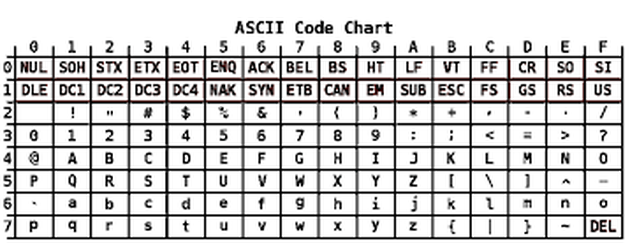
Binary is used to represent Alphanumeric characters. As computers only understand binary they have to convert them using character sets. Character sets also include commands such as enter, backspace and the function buttons.
History
Teleprint
Teleprint is a early version of character sets that were used to represent letters in computers. There are 7 bits for this code which represents 128 characters.
Other characters
Some characters are called control characters, such as Null and Del. These were used for paper tape editing for saving data.
ASCII
(The American Standard Code for Information Interchange)
It was published in 1963 and used 7 bit binary codes to represent 128 characters, such as all the english language characters ,numbers and some symbols and commands. A 0 is added at the beginning to form a byte but is not used. However, it caused problems such as characters appearing different on other manufactures computers.
Extended ASCII
It uses 8 bits which represent 256 characters. The first 128 characters are from ASCII. It also included symbols for non-english languages that uses the same writing style.Each character is therefore made up of a byte. Extended ASCII was adapted for other languages in those countries.
Unicode
It replaced ASCII as it can allow different languages which have a different alphabet. It holds 2 to the power of 21 characters and uses 16 and 32 bit binary codes. It also now allows for Emoticons/Emojis.
Key Concepts
ADC- Analogue to Digital converter
DAC- Digital to Analogue converter
Analogue- Continuous
Digital- Discrete
Bit rate- Bits per second
Bit depth- Bits per sample
Sample rate/frequency- Amount of snapshots taken each second
Sampling Interval - Time between a sample
Saving sound as a digital file
Sound is a analogue Sound wave, which means it is continuously changing data. To save on a computer, the microphone coverts it to a electrical analogue signal. Then an ADC coverts it to digital sound wave. This is called sampling.
- The accuracy of a sample is determined by the bit rate.
- The quality is determined by the sample rate.
Digital data loses a lot of the data from the analogue data. Therefore to improve it, samples should be taken more often (every few milliseconds).
Calculations
Bits required to store 1 second of audio=bit-rateXsample-rateXchannels
A CD has a bit-rate of 32 bits. It has a sample rate of 5000 Hertz. It has two speakers.
Bits required to store 1 second of audio.
32(bits) X 5000 (hertz) = 160,000 x 2 = 320,000.
To get it to bytes you need to divide by 8 to get 40,000 the to get megabytes divide by 1,024 to get 39MB and then so on.
Binary
A sample can be saved as a binary byte. For 16 bits it could look like this. 1010111010110001.
Editing Audio
Audacity has many tools that allow you to manipulate sounds such as changing the sample and bit rates and adding effects such as reverse and changing the speed.
Changing the set rate
When you change the set rate so that the amount of Hertz are lower, the sound begins to sound quieter and has a lower pitch and also makes the sound last longer. When the Hertz are increased the sound is quicker and high pitched.
Changing the sample/bit rate
When you change the bit rate the sound does not change with this music but sometimes if you lower it sounds like it is crackling and if it is increased the sound sounds more smoother because it takes more snapshots of the sound per second called ‘samples’, so that it sounds more like the original recording.
Changing the sample size
A bigger sample means that quieter sounds will be picked up, which improves the quality.
Improving Audio
You can improve audio by increasing the bit rate which will make the sound smoother and you can increase the set rate and Hertz which will make the sound clearer.
As these methods all add more bits, the bit rate increases, making the file larger.
STORING IMAGES
Images are stored as a collection of pixels in a bitmap.
The colour of each pixel is represented by a binary code and the more bits it has, the more choice of colours it has. Black and white images only use two colours so 1-bit pixels are used. 2-bit pixels allow for 4 different colours. (00,01,10,11)
The colour depth is the amount of bits used per pixel.
This can be worked out by: Total Number Of Colours = 2^n
n=number of bits per pixel(bpp)
The most common bpp is 24. 8 of the bits represent shades of red, green and blue. The eye can see 10,000,000 (10 million) colours so 24-bits will cover all of them.
The resolution is the desity of pixels in an image, measured in dots per inch (dpi).
A higher resolution means that there are more pixels in an area, increasing the quality.
Example:
Resolution = 60 dpi (1 inch=60 pixels wide and high)
60X60= 3600 pixels in the square inch.
Resolution = 100 dpi (1 inch=100 pixels wide and high)
100X100= 10,000 pixels in the square inch. - Better quality
Increasing the resolution or colour depth means that there are more bits per image and subsequently a larger file size but better quality.
Metadata
Metadata is information stored in an image file that helps the computer recreate the image on the screen using the binary data from each pixel.
It includes:
File Format
Height
Width
Colour depth
Resolution
It is needed for the computer to display the image as it is stored.
Digital cameras contain information about the photograph called EXIF Metadata.
(Exchangeable Image File Format)
It includes:
Location (exact co-oridnates using GPS)
Time
Data
Camera Model
Aperture
Shutter speed
ISO number
Focal depth
Dots per inch (dpi)
This data can be extracted from any image. So when a image is uploaded online, anybody can download it and find out information about it that can trace it to its photographer.
There are 3 types of image metadata:
Techical
This includes data about how the photograph was taken. (EXIF metadata) Descriptive
This includes data added to the image while editing such as the name of he image, the name of the creator, keywords, captions, titles and comments. This allows the image to be searched. Administrative
This includes information about the usage rights of the image such as licences, restrictions and contact information.
Bit
a single binary digit
either a single 1 or a single 0 - nothing else
Nibble
a sequence of four bits
a whole number between o and 15
Byte
a sequence of 8 bits
an individual keyboard character, such as '#' or 'k'
Kilobyte - kb
approximately 1,000 bytes (1,024)
a paragraph of text, containing around 200 words
Megabyte - mb
approximately 1,000 kilobytes (1,024) or 1,000,000 (one million) bytes
around one minute of average quality mp3 music
Gigabyte - GB
approximately 1,000 megabytes (1,024) or 1,000,000,000 (one billion) bytes
around 90 minutes of standard definition video
Terabyte - TB
approximately 1,000 gigabytes (1,024) or 1,000,000,000 (one trillion) bytes
depending on the quality, several hours of video
Petabyte - PB
approximately 1,000 terabytes (1,024) or 1,000,000,000 (one quadrillion) bytes
2000 years of mp3