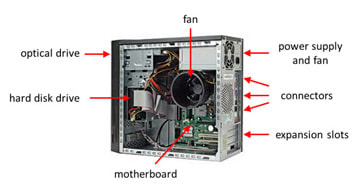
Power Supply Gives power to the motherboard, drives and other hardware.
Case Cooling Fan Extracts the hot air out of the computer casing.
CPU heat sink and Cooling Fan Metal block with slits that keeps the CPU beneath cool to stop overheating. Has a fan above to extract hot air from the CPU.
CPU Carries out the processing.
Optical Drive To use optical disks and read/write from/to them.
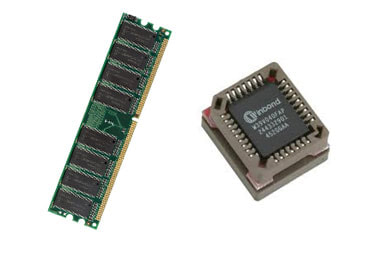
Ram Sticks Provides memory for the CPU to use. Memory slots into a slot and can be changed/upgraded.
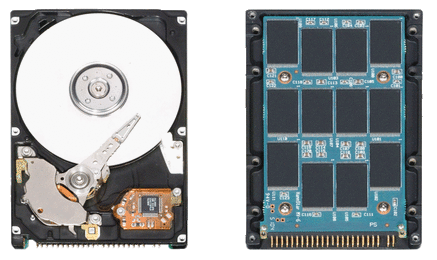
Hard Disk Drive Internal secondary storage. Can be changed/upgraded for a bigger capacity or better read/write speeds. (Using a SSD instead)
Motherboard Main circuit board where all the hardware is connected.
Graphics Card Process graphics and images so that the CPU does't have to. May be built into the CPU (integrated) or may need an external card (dedicated). Graphics card slots into a slot and can be changed/upgraded. Dedicated GPU's are used for PC gaming and designing.
Embedded Systems
What are embedded systems? An embedded system contains all the components of a computer such as; RAM, ROM, a Processor, clocks, Inputs and Outputs. The embedded system is also known as a micro-controller for a dedicated system. It is used in TVs, washing machines, phones, tablets, cars and microwaves. The embedded system contains instructions that are compiled when a function is selected.
Why do we need embedded systems? We need embedded systems so that we don't have to keep selecting a option for each function. It allows you to leave a device running while you go and do something else. For example, with a washing machine, you would otherwise need to keep pressing buttons to release soap and spin the bowl.
The Processor
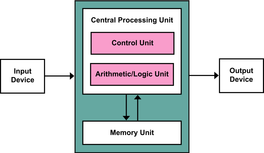
The CPU is the 'brain' of the computer and processes all the data and instructions that makes the computer run. by processing binary data. It has three main parts:
The Control Unit (CU) Executes program instructions through the fetch-decode-execute cycle. It also controls the data flow to all the different parts and to the main memory and input/output devices. It controls timing, through the use of a clock, and carries out fetching and decoding. After each cycle it is incremented / 1 is added.
The Arithmetic Logic Unit (ALU) It carries out all the (arithmetic) calculations and does simple addition and subtraction and by repeating it can do multiplication and division. It can also (logically) compare the size of numbers as well as performing logical operation including AND, OR and NOT along with binary shifts. It also contains the accumulator register.
The Cache It is fast memory in the CPU that is slower than registers but faster than RAM. As the data is contains is regularly used, it is designed to be fast, so the CPU checks for data there before RAM. It contains registers that temporarily hold data. Cache comes in different levels; L1, L2, L3... that get slower but can have a higher capacity.
Von Neumann Architecture
The CPU runs programs, stored in memory, that have instructions and data which get stored in memory addresses.
Before, the Harvard model was used. The difference is that Von Neumann uses only one memory for data and instructions, whereas Harvard used separate ones.
The CPU uses a range of registers where binary digits are read and written on the CPU: The Control unit has a Program Counter (PC) that holds memory addresses of each instruction during its cycle. The ALU has a Accumulator that stores the results of calculations before it is wrote to the memory. The Memory holds program instructions and data. The Memory Address Register (MAR) holds the memory address about to be used by the CPU which may point to data or an instruction. The Memory Data Register (MDR) holds the data or instruction, which may have been fetched from memory or waiting to be written to the memory.
The CPU also has buses to transfer data between the parts of the CPU. The Address Bus is one way and requests data from the memory for the MAR. The Data Bus moves data to and from the memory from the MDR.
FDE Cycle
A CPU carries out instructions millions of times per second.
Fetch The Memory Address is copied from the Program Counter to the MAR, which is then copied to the MDR. The Program Counter is then incremented. Decode The CU decodes the instruction in the MDR and prepares for the next stage by loading the values into the MAR or MDR. Execute The instruction happens which could be to load or write data from/to the memory, do a calculation or logical operation, or change the PC address, or halt the program.
Performance
A CPU can be made to run faster through different methods.
Clock Speed The number of instructions a computer can carry out per second. (Hz = million per second) (GHz = billion per second) The higher it is, the more instructions can be preformed. Overclocking, making the CPU run faster than it is set at, can cause overheating, crashes and permanent damage. Therefore cooling systems are needed.
Number of Cores Each core can process instructions independently. So with more cores, more instructions are preformed.
Cache Size More cache reduces relience on the RAM so data will be feteched and processed quicker.
3 Tiers of Storage
Primary Storage Memory that the CPU can access quickly. (CPU registers, cache, ROM and RAM) It has the fastest Read/Write speeds and is usually volatile.
Secondary Storage Non-volatile and keeps all the not in use files, applications and operating systems. (HDD, SDD, CD and SD) Read/Write speeds are slower than primary storage.
Tertiary Storage Non-volatile and used for long term storage. Used for archives and backups of massive amounts of data. (Magnetic Tape Library, uses a robotic arm to access tapes)
Flash Memory
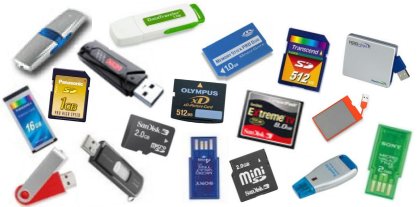
Flash memory does not require power, so when the power is lost, the data will still be there. This means it is non-volatile. Examples of these are: SD cards, memory sticks and compact flash. Smaller versions of these are mini and micro SD. Flash memory is used in cameras and phones as they are compact versions of memory. They are slower than Solid State and have a short read/write life. They have a small size but high capacity.
Hard Drives
HDD stands for Hard Disk Drive. Inside of the hard drive's casing is a metal disk that gets memory wrote onto it in a similar way a CD does. It is non-volatile meaning that it can store memory even when there is a loss of power. When the memory is full the computer will be hard to use as files can no longer be stored. They are the tradition storage of laptops and computers. The disks are magnetic and in stacks with a 5400 to 15000 rpm (revolutions per minute) spins. Data is stored in sectors in round tracks. Read/write heads on the moving arm access these sectors. They are generally long lasting and reliable but can be damaged from dropping and are cheaper than SSDs as they are less robust. HDDs make noise and need defragmenting to free space and bring data together.
Solid State
SSD stands for Solid State Disk. Similarly to hard drives, solid state drives are non-volatile. However unlike HDDs, in a SSD there are no moving parts, so if the computer is knocked the SDD will not be damaged. The way SSD's work is very similar to flash memory but bigger and is used as a better alternative to hard drives as they are much faster. They are silent and more shock proof but will deteriorate after lots of usage.Hybrids use SSD for the OS and programs and HDD for data.
Comparison:
Average Read/Write speeds Optical Disk > Memory Card > Magnetic Tape > HDD > SSD Average Cost per GB Magnetic Tape > Optical Disk > HDD > Memory Card > SSD Average Capacity Optical Disk > Memory Card > SSD > HDD > Magnetic Tape
Optical Disks
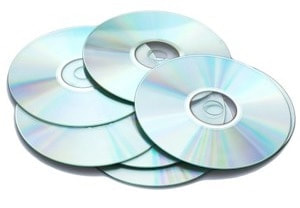
They are cheap and robust and include CDs, DVDs and Blu-RAy disks. CDs hold 700MB, DVDs 4.7GB and Blu-Rays 25GB. They have three forms; read-only (CD/DVD/BD-ROM), write-once (CD/DVD/BD-R) and rewritable (CD/DVD/BD-RW). However, streaming and download services are decreasing their usage and phones and tablets as well as new laptops don't have CD drives. They were popular for backups but flash was better for storage size and faster read/write speeds and better reliability. They are also portable and aren't damaged by water or shocks but can easily get scratched.
Magnetic Tape
Magnetic tapes have a higher storage capacity so they are used for archiving and have a low cost per GB. They come in plastic cassettes and require a special tape drive for reading and writing. Magnetic Tapes are read/written sequentially, from the beggining to the then end (unless the computer stops it), which means it is hard to find specific data as it is slow but is fast when the place has been found.
RAM
RAM stands for random-access-memory. It is high-speed and can be read and written to. RAM keeps the data, files and programs as storage while they are being used as it is quicker to load from. The OS (operating system) is also saved to the RAM when the computer boots. It allows you to autosave files and data to the usually 8GB of memory. RAM is volatile meaning that when there is a loss of power the data will be erased. However like cache memory RAM will sometimes keep the data if there has been a power-cut or unexpected shut-down. If the RAM becomes full up then your computer will use virtual memory where it uses a part of you hard drive like RAM. However this can cause the computer to become slow.
ROM
ROM stands for read-only-memory which means it can only be read not wrote on. It is built into the motherboard and is used to help boot up the computer and launch the BIOS. (basic-input-output-system) It also performs hardware checks and can be updated by flashing the BIOS. ROM is non-volatile meaning that when the power is disconnected the data will still be retained. The amount of ROM is significantly less than RAM as a large capacity is not needed as it can not be wrote on.
Virtual Memory
Virtual memory is when data is saved to the hard drive and is used like RAM, but is slower. Virtual memory lets you use multiple applications at once and is the storage space we use on a hard drive that we use similar to RAM. It is created by the operating system when RAM becomes full. Sometimes when we talk about virtual memory and RAM, we call RAM physical memory. Memory can be split into smaller pieces which have a fixed size and are called pages. The operating system senses which pages are just in running in the background and transfers them from the RAM to the virtual memory. Pages which are used frequently will be kept on the RAM as they can be launched quicker. Pages moving between the RAM and virtual memory takes time and can slow down a computer if a computer does this too often. This is called disk thrashing. Even though virtual memory is useful it can slow down you user experience as RAM is much faster than hard disks. One way to speed up a computer is to add more RAM, as the more RAM you have the less virtual memory you will need. If there was no virtual memory then you would not be able to use lots of applications at once and auto-saved data will start to disappear.
Networks
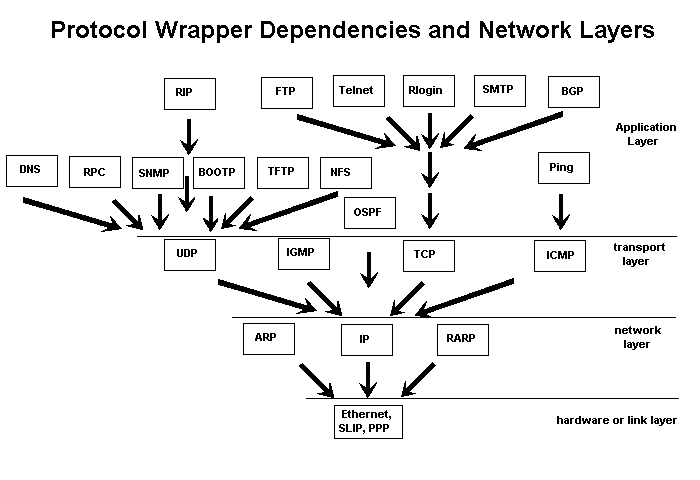
TCP/IP
(Transmission Control Protocol/Internet Protocol)
Decides how data is transferred in a network such as the internet. The two protocols work together to send the data.
TCP stands for Transmission Control Protocol. It decides how devices connect in the network. It comes into work after the IP. Its job is to break the data transferred by the IP into data packets then reassemble the packets of data once fully delivered by the IP. It also checks that the data has been properly sent and delivered. TCP is part of the second layer the transport layer.
IP stands for Internet Protocol. Its job is to deliver the packets of data when files are transmitted on the internet and also switch the packets. Each device has its own IP address. (e.g. 127.0.0.1) The IP address is stored in a data packet. They are either 32 or 128 bits. In the network layers IP is in the 3rd row the network layer. IPv4 and IPv6 are most commonly used.
HTTP/HTTPS
(Hyper Text Transfer Protocol) (Hyper Text Transfer Protocol Secure)
It is used to access websites and talk to web servers by the web browser. It can be seen at the beginning of URLs. It defines how data is formatted and transferred on the internet and also decides how the browser and web server should respond to your command.
HTTPS is an encrypted version of HTTP that encrypts all data sent and received to stop data interception by hackers who may want to steal your personal information. The S stands for secure and uses the Secure Socket Layer.
FTP
Used to open, edit and transfer files between devices on a network whether locally on the computer or globally through the internet. This could be to get files such as emails from the server onto your computer. It works using the server-client model using a unique data connection. This also is paired with SSL (Secure Socket Layer) to provide a more secure connection where the data cannot be intercepted. However SFTP (SSH File Transfer Protocol) is used instead but has a different technological architecture. FTP has existed before the GUI (Graphical User Interface) on a command line. It has two modes Active and Passive. In Active, the client is always waiting for a request from the server. On the other hand with Passive, the client has a firewall and must secure a connection with the server first before the server can contact it. HTTP was seen as a better alternative for FTP for websites as it fixed certain bugs. For a user to access the FTP, a normal username and password combination is used.
POP/IMAP
(Post Office Protocol)(Internet Message Access Protocol) POP stands for Post Office Protocol and the most recent version is version 3 which was eventual replaced by IMAP. It gets emails from the server but once the email is downloaded it is deleted from the server and is part of the application layer. There is however an option to retain the emails on the server but would stop its advantage of using less storage space which was the reason for its quick adoption at the time of production.
IMAP stands for Internet Message Access Protocol and is a favourite alternative to POP due to its ease of use for the user but uses more complicated technology and is also on the Application Layer. Like POP it retrieves emails from the server but will only delete from the server once the user has manually done so. The only way to access the emails is by downloading them. It is used by most email clients. IMAP supports online and offline reading of emails as they are kept by the mail client.
SMTP
(Simple Mail Transfer Protocol)
This is used to send emails and also to transfer them between servers. It is used by serves to retrieve emails but end users with email clients use POP or IMAP instead. It uses the DNS (Domain Name System) to look up the mail exchanger record to find the recipients email address. Local Mail Transfer Protocol ( a derivative of SMTP) is uses for a MDA (Mail Delivery Agent) to deliver emails to the storage. SMTP works with a mail envelope as it only defines the transfer method not the content of the email.
TCP/IP Stack
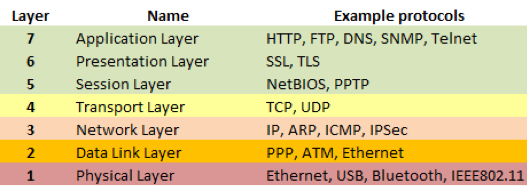
There are seven main layers in networks that determine how data is sent between computers called the Open Systems Interconnection model (OSI Model). It is sometimes called network layers despite only one layer having the mane of network layer, however, multiple layers are used to connect networks with hardware and protocols. It is made up of protocols that work with those on other levels to transfer the data. The aim of the model is to characterise and standardise different functions by grouping similar ones together.
The first layer is called the Physical layer which deals with USB, Bluetooth and Ethernet for wired and wireless connections and provides a basic data transfer system. It deals with how electrical signals are sent along with the electrical pins, voltages, signal timing and frequencies. It only sends raw data and does not format it. In a network is works with hubs, cabling, adapters, modems and repeaters but does not work with any protocols.
The second layer is called the Data link layer which deals with node to node data transfers that are connected. It also detects and fixes any errors in the Physical layer and brings in protocols to establish and terminate connection between two wired devices. It is made up of two sublayers, divided by the IEEE802; of which the first is Media Access Control (MAC) layer for controlling how devices connect to others and get permission to transfer data in a network and the second Logical Link Control (LLC) layer for identifying which network layer protocols need to be used as well as checking for errors and synchronising frames. An important protocol which works over multiple layers is the Point to Point Protocol (PPP) which creates the direct connection between the nodes (redistribution points on the network were data is transferred to then sent to the recipient.).
The third layer is called the Network layer which allows Variable Length Data Sequences (Datagrams) to transfer data between devices on a network. It allows data to be transferred with just the address of the recipient’s node and the content. However, if the data being sent is too big, it will split the data into fragments and send them individually, then reassembling the fragments to get the original format of the data. If needed it can also report delivery errors. This layer can also handle message delivery though the protocols but does not always as it is not seen as reliable. On this layer the network protocol IP (Internet Protocol) helps to deliver the data packets.
The fourth layer is called the Transport layer which allows Variable Length Data Sequences (Datagrams) to transfer data between devices on a network rather than the nodes while not reducing any quality. It deals with flow control, segmentation and desegmentation as well as error control. Some of the protocols work by being state and connection orientated allowing the Transport layer to resend segments that failed to send originally. Additionally, it has to give a confirmation of successful, data transmission then sending the next data. The data received by this layer from the Application Layer is turned into packets through packetising to turn a long message into smaller ones. The transport layer can be seen as a post office which deals with the envelope but not the data being send/the content. Despite not conforming to the OSI definition of the transport layer, the TCP (Transmission Control Protocol) is a part of this layer that builds upon IP from the previous layer to transfer individual data packets and reassemble them along with checking or many errors.
The fifth layer is called the Session layer which controls connections between computers by establishing, managing and terminating connections in local (computer to computer or server) and remote (computer to server through virtual interface) application. It allows simple termination and restart along with the easy close of session to stop data still being sent accidentally. It also deals with session check pointing and recovery in a remote procedure call environment.
The sixth layer is called the Presentation layer which deals with how the data is received. It helps to covert network formats into application format so that it can be used along with formatting and encrypting the data sent in the network to stop data interception. Therefore, it also has the name of Syntax Layer. This layer originated when EBCDIC coded text files were used and needed to be converted into ACII coded files. On this layer the SSL protocol (Secure Socket Layer) is used to carry out the encryption.
The final seventh layer is called the Application layer which is closes to the end user as the software application connects the user and Application layer together. It is used in software applications that are used for some sort of communication. Functions include identifying communication partners, determining resource availability, and synchronizing communication. It identifies communication partners (the recipient device) to make sure it is the right device receiving the data sand that they are able to receive it. Also the application layer has to decide whether there are enough resources to carry out the communication. On this layer is HTTP (Hyper Text Transfer Protocol) in order to access websites and talk to web servers by the web browser. There is also FTP (File Transfer Protocol) used to open, edit and transfer files between devices on a network along with DNS (Domain Name System) which gives websites IP addresses a human name so that humans can easily remember and access the site. This works by routing the domain name to the IP address. Also on this layer is SMTP (Simple Mail Transfer Protocol) to send and transfer emails between severs.
PEER-TO-PEER
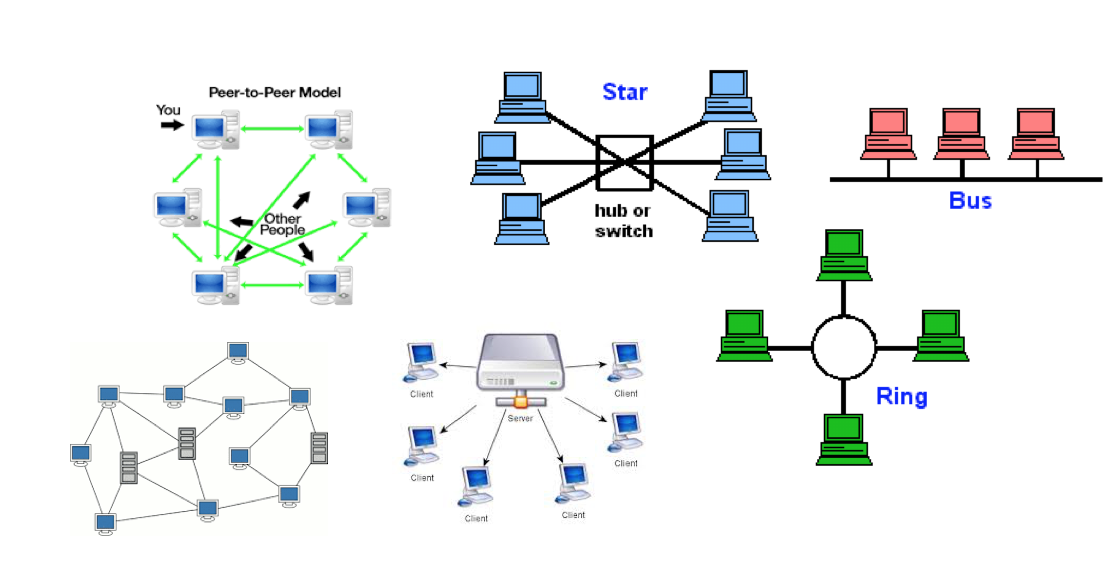
Peer2Peer is where there is no main server and all computers are connected to each other and files are shared between computers. File sharing is quick as each computer has a copy but can delete it. If one fails, all of them do not fail. No central control on security, updates and back-ups. Anybody can set it up and clients are not dependable on the server. Common in homes where a computer is connected to a printer. May cause confusion with multiple versions of a document and devices slow down with more.
CLIENT SERVER
Two computers connect to a server. Client depends on the Server. Server makes request. Have central file and application storage, security, management, dependency, performance and backups. Web servers host websites and use HTML and Apache that is open source. Application servers use databases using SQL, structured query language. NAS is network attached server for storing and sharing files such as music and videos. Print servers connect devices to print which stops drivers being used. Mail servers store emails. Browser makes request to fetch email. The server also stores user profiles and their passwords. Easy to maintain files, make back-ups, update and is more secure than other methods but needs people managing it and can be expensive as it needs IT specialists. If multiple devices are requesting the server, it may become overloaded which could make it down down, stopping all access.
STAR NETWORKING
Each device has its own cable to connect to a hub, server or a switch, making it easy to add more devices but can get expensive with wires. The hub sends data to every device and a switch sends data to the destination device. It is very reliable and will still work if one device fails and is fast and high preforming but expensive to install as lots of hardware is needed and if the hub or switch fails the network stops. It is commonly used in offices or schools and can be wired or wireless. All devices can transmit data at once as a switch deals with requests and minimises data collisions.
MESH TOPOLOGY
Mesh is where devices are connected to each other but not all are useful. When one is down the rest will still run. High cost with full mesh as all computers are connected to each other and can become hard to maintain. Partially connected Mesh is where all are computers are not connected to each other so it is cheaper as less cables are needed.
Unlike Peer2Peer, Mesh allows devices to communicate with devices not connected to it directly and instead through another device as each device also acts as a router.
TRADITIONAL METHODS
BUS
All computers are lined up in a row along a single backbone cable. Data is sent in both directions that cause collisions so it is very slow. There is a terminator on both ends to indicate that data cannot go anywhere outside the network.
RING
All devices are put into a ring/circle. Data travels in one direction to stop collisions but only one device can send data at a time and means that the data passes through all the devices in its path.
The Internet
Everybody uses the internet somewhere in their lives! For business, research or just for fun. The dictionary definition is 'a global computer network providing a variety of information and communication facilities, consisting of interconnected networks using standardised communication protocols.' or simply a network that connects devices to share data. Which is used by the Web to find web pages. The internet was created over a process of time by people such as Leonard Kleinrock, Steve Carr, Steve Crocker, Jeff Rulifson, and Ron Stoughton and Elmer Shapiro in the 1960s.
The World Wide Web
Many people get two things mixed up the Internet and the Web. So here is what the web is; The World Wide Web is abbreviated as WWW. (Yes, the thing you type at the beginning of URL's.) The Webs job is to host websites. The dictionary definition is 'an information system on the Internet which allows documents to be connected to other documents by hypertext links, enabling the user to search for information by moving from one document to another. or shortened down it basically means, a system containing information that links files and is easy to search on, or a site host. However, now that apps are becoming more popular, the internet is used more for apps than the Web.
Web Browsers
Web browsers do what they say, they browse the web. Web browsers are a piece of software that can open up web pages and let you use the internet. It can let you access your emails and when you type in a web address and it will find the ip address by contacting severs in a matter of seconds using the internet and will load up the web page straight away.
Web Pages
Web pages are just the technical term for websites. A web page is viewed in a web browser. Every web page had its own ID called a IP address. (For instance our websites IP address is 199.34.228.53.) A website also has a domain name. This is the technical term for the link you are visiting. (For instance our websites domain name is computationalblogging.tk). Websites also use HTTP or HTTPS standing for Hypertext Transfer Protocol or Hypertext Transfer Protocol 'Secure'. It is used to exchange information between webpages. Another technical term is Cookies which are used to give information about the visitor to the webpage.
The Internet has now become a essential thing and is being used for different things such as apps and calling and messaging on our smart devices instead of just web pages. Now the internet has reached our household devices such as fridges, washing machines and one day even our houses and cars may be ran by the internet.
Network Types
LAN - Local Area Network These networks are all at one location and owned by 1 organisation. It is mainly used in businesses and schools. LANs can go around different buildings but to access them you have to be on site. The Hardware is owned by the organisation.
WAN- Wide Area Network A WAN is used to connect together LANs around multiple sites. These Networks can be used international and typically uses a public network. The organisation usually owns the internal hardware.
VPN- Virtual Private Network A VPN is used to connect LANs over public networks so that the servers can be connected to from a are outside the LAN such as a persons home. The external person will be able to use the network as if they were at the location of the LAN. The connection is very secure as encryption is used.
Wired Network A wired network is connected with wires between each of the computing equipment. It is generally faster than wireless networks. However it is very hard to move the connected devices.
Wireless Networks A wireless network connects devices together using electromagnetic radiation. There is no wired connection required and the radiation is generally used in microwaves. Smartphones, Laptops and Tablets can connect using WIFI or 3G or 4G.
WI-FI WI-FI is the wireless standard that uses the radio frequencies 2.4 and 3.5 GHz. They are split into channels that overlap to cover smaller ranges. Multiple channels used together causes interference so ones that don't overlap are used.
SERVER TYPES
Server A server is a system on a network that allows a service to be provided to the client.
Database server This allows clients or software to connect to a central database. The service is provided by the DBMS the Database Management System. SQL is also another type of database server. SQL stands for Structured Query Language.
Web Server Uses HTTP to serve web pages to clients. It serves HTML, JavaScript, CSS and images. Apaches is a common type of this server. A web page on a server is called the Intranet.
File server A server used to store files. The files are backed up and restored regularly and can be accessed from any computer.
Print Server A print server sends the documents to the printer. It can also store documents for later usage.
Mail Server This server sends, receives and stores emails using IMAP, POP and SMTP protocols. Services like GMAIL and OUTLOOK use these servers.
Packets
1. Data is split into equal sizes packets.
2. Packets given address of recipient.
3. Packets given a number.
4. Packets given error checking data.
5. Packets sent across network.
6. Recipient checks if packets are received.
7. Otherwise checks again with a timer until received or time out message given.
8. Packets reordered by number.
9. File displayed.
10. Sends confirmation to sender.
11. Error Checking and if is a message is sent to sender.
NETWORK HARDWARE
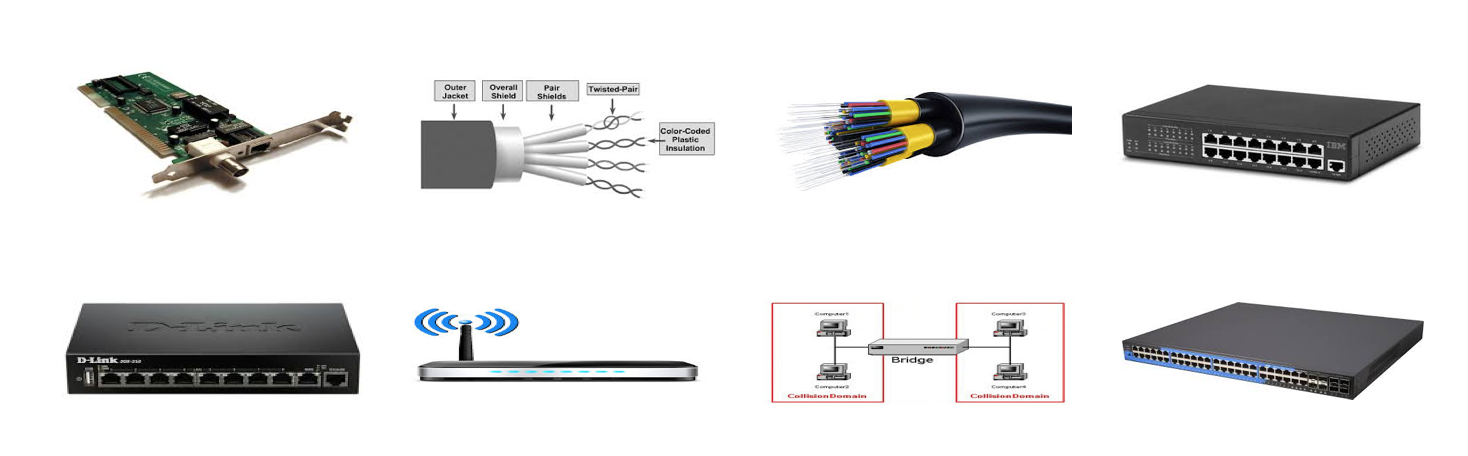
Network Interface Card (NIC) It is connected to a computer so that the computer can connect to a network. Computers that use LAN have one built in. Contains the Ethernet port.
Copper Cable Unshielded Twisted Pair (UTC) It is a cheap method to connect hardware together in LANs. However it does not have high bandwidth and allows interference from coaxial or fibre optic cable.
Fibre Optic Cable Contains glass threads which transmit messages onto light waves. They have better bandwidth and less interference. They transfer data digitally rather than analogically.
Hubs (Ethernet) Connects lots of devices together through Ethernet to create a network. It is similar to a Switch.
Router Forwards data packets in networks. Connected to two networks of LANs and WANs.
Wireless Router Same as a router but includes the function of a Wireless Access Point. Can give extra firewall protection.
Bridges Connects two networks together. Do not re-route messages. Divide LAN into two to reduce traffic.
Switches Connects devices together on networks. Use packet switching to receive, process and forward data.
MAC AND IP ADDRESSSES
A MAC address is a unique identifier for each device. They can not be changed and are in either a 48 or 64 bit binary number. It is converted into 6 hexadecimals to be easier to read and is used by LAN's to send data to the correct device.
IP Addresses are the network identifier. Static IPs are expensive and permanent and connect printers and point to websites as they do not want to change or they would need re-routing each time. Dynamic IPs are used for devices to connect to a network server as they cheaper and can be reused, meaning you may get a different one each time your online. They are assigned by ISPs. (Internet Service Providers) The address is either a 32 bit binary number that is converted into 4 decimals or a 128 bit number that is converted into 8 hexadecimals.
THE INTERNET
The Internet - a connected WAN that connects devices to networks worldwide through the TCP/IP protocols. The World Wide Web - WWW is a collection of websites hosted on web servers and accessed through the HTTP protocol.
DNS Domain Name Server. A server that stores IP Addresses with a domain name that is more accessible for humans to remember that gets translated into the IP Address.